﻿---
title: "用 Go 写 Mac 桌面程序：原生窗口和菜单栏图标"
description: "Go 写的小工具，最省事的界面是起一个 http server 再打开浏览器。如果想要的是 Mac 上那种双击就开、右上角菜单栏常驻一个图标、点一下弹出面板的程序，该怎么做？顺着问题往下追：窗口归 AppKit 管，Go 怎么调到它；为什么界面代码必须锁在主线程上；菜单栏图标、弹出面板和不进 Dock 是怎么做到的；Fyne、Gio、Wails、systray 等十几个现成的库，窗口里的内容各是谁画的，哪些里面其实是网页；两个库各管窗口和图标时为什么打架；最后怎么打成 .app、签名和公证，发给别人也能打开。全部方案在同一台 macOS 15 上实测。"
pubDate: 2026-10-24
tags: ["Go", "macOS", "GUI", "工具"]
hero: "./hero.svg"
refs:
  - id: appkit
    title: "AppKit"
    url: https://developer.apple.com/documentation/appkit
    site: Apple Developer
    note: "macOS 上窗口、菜单、控件和事件循环所在的框架，Objective-C 接口。"
  - id: objc-msgsend
    title: "objc_msgSend"
    url: https://developer.apple.com/documentation/objectivec/1456712-objc_msgsend
    site: Apple Developer
    note: "Objective-C 的方法调用在运行时都编译成对它的调用：给对象发一条以选择子（selector）命名的消息。"
  - id: cgo
    title: "cgo"
    url: https://pkg.go.dev/cmd/cgo
    site: Go
    note: "`#cgo CFLAGS: -x objective-c` 可以让 cgo 用 clang 编译 Objective-C；`CGO_ENABLED=0` 时带 `import \"C\"` 的文件全部不参与编译。"
  - id: purego
    title: "ebitengine/purego"
    url: https://github.com/ebitengine/purego
    site: GitHub
    note: "不用 cgo 从 Go 里调用 C 函数；`purego/objc` 子包封装了 `objc_msgSend`、`RegisterClass` 等运行时函数。文中用 v0.11.2。"
  - id: lockosthread
    title: "runtime.LockOSThread"
    url: https://pkg.go.dev/runtime#LockOSThread
    site: Go
    note: "“All init functions are run on the startup thread. Calling LockOSThread from an init function will cause the main function to be invoked on that thread.”"
  - id: main-thread
    title: "Main Thread Checker"
    url: https://developer.apple.com/documentation/xcode/diagnosing-memory-thread-and-crash-issues-early#Detect-improper-UI-updates-on-background-threads
    site: Apple Developer
    note: "AppKit、UIKit 的界面对象只能在主线程上使用；在后台线程更新界面会导致界面不刷新、显示错乱甚至崩溃。"
  - id: perform-main
    title: "performSelectorOnMainThread:withObject:waitUntilDone:"
    url: https://developer.apple.com/documentation/objectivec/nsobject/1414900-performselectoronmainthread
    site: Apple Developer
    note: "把一条消息排进主线程的 run loop，由主线程执行。"
  - id: nsstatusitem
    title: "NSStatusItem"
    url: https://developer.apple.com/documentation/appkit/nsstatusitem
    site: Apple Developer
    note: "菜单栏右侧的图标。由 `[NSStatusBar systemStatusBar] statusItemWithLength:` 创建，`button` 属性可以设图片、标题和点击动作，`menu` 属性设下拉菜单。"
  - id: nspopover
    title: "NSPopover"
    url: https://developer.apple.com/documentation/appkit/nspopover
    site: Apple Developer
    note: "带小箭头的弹出面板；`showRelativeToRect:ofView:preferredEdge:` 让它贴着某个视图弹出，`NSPopoverBehaviorTransient` 表示点别处自动收起。"
  - id: template-image
    title: "NSImage.isTemplate"
    url: https://developer.apple.com/documentation/appkit/nsimage/istemplate
    site: Apple Developer
    note: "模板图只取 alpha 通道，系统按当前外观（浅色、深色、高亮）给它上色。菜单栏图标应该用模板图。"
  - id: activation-policy
    title: "NSApplication.ActivationPolicy"
    url: https://developer.apple.com/documentation/appkit/nsapplication/activationpolicy
    site: Apple Developer
    note: "`regular`：普通 App，有 Dock 图标和菜单；`accessory`：没有 Dock 图标，也不显示自己的菜单栏，可以有窗口。"
  - id: lsuielement
    title: "LSUIElement"
    url: https://developer.apple.com/documentation/bundleresources/information-property-list/lsuielement
    site: Apple Developer
    note: "Info.plist 键，为 true 时这个 App 是 agent app：在后台运行，不出现在 Dock 里。"
  - id: bundle
    title: "Bundle Structures"
    url: https://developer.apple.com/library/archive/documentation/CoreFoundation/Conceptual/CFBundles/BundleTypes/BundleTypes.html
    site: Apple Developer
    note: "macOS App 包的标准结构：`Contents/Info.plist`、`Contents/MacOS/`、`Contents/Resources/`。"
  - id: notarize
    title: "Notarizing macOS software before distribution"
    url: https://developer.apple.com/documentation/security/notarizing-macos-software-before-distribution
    site: Apple Developer
    note: "用 Developer ID 证书签名并开启 hardened runtime，提交给 Apple 公证服务，通过后用 stapler 把公证票据钉到 App 上。"
  - id: notarytool
    title: "Customizing the notarization workflow"
    url: https://developer.apple.com/documentation/security/customizing-the-notarization-workflow
    site: Apple Developer
    note: "`xcrun notarytool submit … --wait`、`xcrun stapler staple`；旧的 altool 从 2023-11-01 起不再被公证服务接受。"
  - id: sequoia-gatekeeper
    title: "What's changed in runtime protection for macOS Sequoia"
    url: https://appleinsider.com/inside/macos-sequoia/tips/whats-changed-in-runtime-protection-for-macos-sequoia
    site: AppleInsider
    note: "macOS 15 起，不能再按住 Control 点“打开”绕过 Gatekeeper，要到“系统设置 → 隐私与安全性”里点“仍要打开”。"
  - id: rcodesign
    title: "apple-codesign（rcodesign）：Notarizing and Stapling"
    url: https://gregoryszorc.com/docs/apple-codesign/main/apple_codesign_rcodesign_notarizing.html
    author: Gregory Szorc
    note: "Rust 写的独立实现，能在 Linux、Windows 上给 Mach-O 和 .app 签名、提交公证、staple，不需要 Mac。"
  - id: darwinkit
    title: "progrium/darwinkit"
    url: https://github.com/progrium/darwinkit
    site: GitHub
    note: "原名 macdriver，从 Apple SDK 生成的 AppKit、Foundation、WebKit 等 Go 绑定，底层是 cgo + libffi。文中用 v0.5.0（2024-06）。"
  - id: fyne
    title: "Fyne"
    url: https://fyne.io/
    site: fyne.io
    note: "跨平台 GUI 框架，GLFW 开窗口、OpenGL 画控件；桌面端用 `desktop.App` 的 `SetSystemTrayMenu` 做菜单栏图标。文中用 v2.8.2。"
  - id: fyne-systray
    title: "Fyne：System Tray Menu"
    url: https://docs.fyne.io/explore/systray
    site: fyne.io
    note: "官方文档里的系统托盘示例，macOS 上就是菜单栏图标。"
  - id: gio
    title: "Gio"
    url: https://gioui.org/
    site: gioui.org
    note: "即时模式 GUI，macOS 上用 Metal 绘制。文中用 v0.10.3。"
  - id: cogent
    title: "Cogent Core"
    url: https://www.cogentcore.org/core/
    site: cogentcore.org
    note: "纯 Go 的自绘 GUI 框架。文中用 v0.5.0，要求 Go 1.27。"
  - id: wails
    title: "Wails v3"
    url: https://v3alpha.wails.io/
    site: wails.io
    note: "用系统 WebView（macOS 上是 WKWebView）做界面，v3 起支持多窗口和系统托盘（`SystemTray`、`AttachWindow`）。文中用 v3.0.0-beta.34。"
  - id: wails-scheme
    title: "Wails v3 源码：webview_window_darwin.go"
    url: https://github.com/wailsapp/wails/blob/v3-alpha/v3/pkg/application/webview_window_darwin.go
    site: GitHub
    note: "`[config setURLSchemeHandler:delegate forURLScheme:@\"wails\"]`：页面请求由 WKURLSchemeHandler 交给进程内的 Go 代码处理，不经过 TCP。"
  - id: webview
    title: "webview/webview_go"
    url: https://github.com/webview/webview_go
    site: GitHub
    note: "webview 库的 Go 绑定，一个窗口一个 WebView，没有托盘 API；`Dispatch` 把函数排到主线程执行。"
  - id: systray
    title: "fyne-io/systray"
    url: https://github.com/fyne-io/systray
    site: GitHub
    note: "getlantern/systray 的分支，Fyne 也在用。`Run` 自己跑事件循环，`RunWithExternalLoop` 挂到别人的事件循环上。文中用 v1.12.2。"
  - id: energye-systray
    title: "energye/systray"
    url: https://github.com/energye/systray
    site: GitHub
    note: "另一个 getlantern/systray 分支，能分别处理左键、右键点击。文中用 v1.0.3。"
  - id: getlantern
    title: "getlantern/systray"
    url: https://github.com/getlantern/systray
    site: GitHub
    note: "这一系托盘库的源头，最后一次发版是 2023 年的 v1.2.2。"
  - id: menuet
    title: "caseymrm/menuet"
    url: https://github.com/caseymrm/menuet
    site: GitHub
    note: "只为 macOS 菜单栏程序设计的小库：菜单栏文字、下拉菜单、Alert、通知。"
  - id: miqt
    title: "mappu/miqt"
    url: https://github.com/mappu/miqt
    site: GitHub
    note: "Qt 5 / Qt 6 的 Go 绑定，MIT 许可。`QSystemTrayIcon` 在 macOS 上就是菜单栏图标。文中用 v0.15.0 + Homebrew 的 Qt 6.11.2。"
  - id: gotk4
    title: "diamondburned/gotk4"
    url: https://github.com/diamondburned/gotk4
    site: GitHub
    note: "GTK 4 的 Go 绑定。GTK 4 在 macOS 上能跑，但没有托盘 API，界面风格也不是 Mac 的。"
    further: true
  - id: energy
    title: "energye/energy"
    url: https://github.com/energye/energy
    site: GitHub
    note: "Go + CEF（Chromium Embedded Framework），要随程序带一个 Chromium，界面是网页。"
  - id: unison
    title: "richardwilkes/unison"
    url: https://github.com/richardwilkes/unison
    site: GitHub
    note: "GCS 作者写的自绘 GUI 框架（Skia 渲染），偏桌面应用。"
    further: true
---

用 Go 写了一个小工具，想给它加个界面，最省事的办法几乎人人都用过：

```go
http.HandleFunc("/", index)
exec.Command("open", "http://localhost:8080").Run()
log.Fatal(http.ListenAndServe(":8080", nil))
```

界面是有了，但它是浏览器里的一个标签页。关掉标签页程序还在后台跑，再打开要记得那个端口；本机别的程序也能连上这个端口。我们想要的其实是 Mac 上那种常见的小工具：双击一个 `.app` 就开，屏幕右上角的菜单栏里常驻一个图标，点一下弹出一个面板或者窗口，不用时就安静地待在那里。

那么问题来了：Go 的标准库里根本没有窗口，这个窗口从哪来？网上搜到的 Fyne、Wails、systray 名字一大堆，哪些画的是真正的原生窗口，哪些里面其实还是网页？做出来以后，又怎么变成发给别人也能双击打开的程序？

我们用同一个小需求，在一台 macOS 15 上把能找到的做法挨个试一遍。

## 一、窗口的来源

### Go 和 AppKit 之间隔着什么

Mac 上的窗口、菜单、按钮，都归一个叫 AppKit 的系统框架管[^appkit]。Swift 或 Objective-C 写的 App 直接调用它，可 AppKit 是 Objective-C 接口，Go 没法直接 `import`。

好在 Objective-C 的方法调用有一个很朴素的底层形式。`[NSStatusBar systemStatusBar]` 这样一句代码，编译以后就是调用一个 C 函数 `objc_msgSend`：第一个参数是对象（这里是 `NSStatusBar` 这个类），第二个参数是方法名对应的选择子（selector），后面跟着方法的参数[^objc-msgsend]。也就是说，**只要 Go 能调用 C 函数，它就能给 AppKit 发消息**。剩下的问题只是：从 Go 到这个 C 函数，走哪座桥。

### 第一条路：cgo 加一个 Objective-C 文件

最常见的做法是用 cgo[^cgo]。在 Go 文件旁边放一个 `app.m`，里面用 Objective-C 把窗口、菜单栏图标都写好，只暴露几个 C 函数给 Go 调：

```go
/*
#cgo CFLAGS: -x objective-c -fobjc-arc
#cgo LDFLAGS: -framework Cocoa
void appSetup(void);
void appRun(void);
*/
import "C"
```

这样写最直接，Apple 的文档、Stack Overflow 上的例子都能照搬。代价在编译期：cgo 要调用 clang 编译 `app.m`，还要链接 Cocoa，所以必须有 Xcode 命令行工具和 macOS SDK。换句话说，**只能在 Mac 上编译**。我们在 Linux 上用 `CGO_ENABLED=0 GOOS=darwin` 试着编译后面要对比的 10 个库，Fyne、Gio、Wails、webview_go、darwinkit、menuet、miqt 和三个 systray 库，没有一个编得过，报的都是类似的错：

```text
github.com/webview/webview_go: build constraints exclude all Go files in …
fyne.io/systray/systray.go:114:2: undefined: nativeLoop
```

带 `import "C"` 的文件在关掉 cgo 时整个不参与编译，真正干活的函数就都“未定义”了。

### 第二条路：purego，不要 C 编译器

另一条路是 purego[^purego]。它不在编译期做任何事，而是在运行时用 `dlopen` 打开系统库，再用一小段汇编按 C 的调用约定去调函数。它的 `objc` 子包把 `objc_msgSend` 包成了 Go 方法，前面那句 Objective-C 写成 Go 就是：

```go
bar := objc.ID(objc.GetClass("NSStatusBar")).Send(objc.RegisterName("systemStatusBar"))
```

既然编译期不需要 clang，也就不需要 Mac。我们在 Linux 容器里直接编译：

```bash
$ CGO_ENABLED=0 GOOS=darwin GOARCH=arm64 go build -ldflags="-s -w" -o menubar .
$ file menubar
menubar: Mach-O 64-bit arm64 executable, flags:<|DYLDLINK|PIE>
```

把这个 2.2 MB 的文件拷到 Mac 上，窗口和菜单栏图标都正常出来了（第三节的截图就是它）。用 `otool -L` 看，它链接的只有 `libSystem` 和 `libresolv`，AppKit 是启动后才 `dlopen` 进来的。

<figure class="dd dd-figure">
<div class="dd-scroll">
<svg class="dd-svg" viewBox="0 0 800 372" xmlns="http://www.w3.org/2000/svg" role="img" aria-labelledby="gmf1-title gmf1-desc">
<title id="gmf1-title">Go 调用 AppKit 的两条路</title>
<desc id="gmf1-desc">左边是 Go 代码里的一行调用：向 NSStatusBar 发送 systemStatusBar 消息。中间有两条路：cgo 在编译期用 clang 编译 Objective-C 并链接 Cocoa，需要 Xcode 命令行工具和 macOS SDK；purego 在运行时 dlopen AppKit 并直接调用 objc_msgSend，编译期不需要 C 编译器。两条路最后都落到 libobjc 的 objc_msgSend，再进入 AppKit，最后由 WindowServer 画到屏幕上。</desc>
<defs>
<marker id="gmf1-arrow" markerWidth="8" markerHeight="8" refX="7" refY="4" orient="auto"><path class="dd-head" d="M1 1 L7 4 L1 7"/></marker>
<marker id="gmf1-arrow-acc" markerWidth="8" markerHeight="8" refX="7" refY="4" orient="auto"><path class="dd-head-acc" d="M1 1 L7 4 L1 7"/></marker>
</defs>
<rect class="dd-frame" width="800" height="372" rx="10"/>
<rect class="dd-zone" x="16" y="16" width="208" height="340" rx="8"/>
<rect class="dd-zone" x="240" y="16" width="296" height="340" rx="8"/>
<rect class="dd-zone" x="552" y="16" width="232" height="340" rx="8"/>
<text class="t-zone" x="32" y="44">Go 程序</text>
<text class="t-zone" x="256" y="44">桥</text>
<text class="t-zone" x="568" y="44">macOS 进程里</text>
<path class="dd-edge" d="M208 140 H224 Q232 140 232 132 V112 Q232 104 240 104 H256" marker-end="url(#gmf1-arrow)"/>
<path class="dd-edge" d="M208 140 H224 Q232 140 232 148 V236 Q232 244 240 244 H256" marker-end="url(#gmf1-arrow)"/>
<path class="dd-edge-acc" d="M520 104 H536 Q544 104 544 112 V128 Q544 136 552 136 H566" marker-end="url(#gmf1-arrow-acc)"/>
<path class="dd-edge-acc" d="M520 244 H536 Q544 244 544 236 V152 Q544 144 552 144 H566" marker-end="url(#gmf1-arrow-acc)"/>
<line class="dd-edge" x1="668" y1="164" x2="668" y2="196" marker-end="url(#gmf1-arrow)"/>
<line class="dd-edge" x1="668" y1="272" x2="668" y2="296" marker-end="url(#gmf1-arrow)"/>
<rect class="dd-card" x="32" y="64" width="176" height="152" rx="6"/>
<path class="dd-card-head" d="M38 64 H202 Q208 64 208 70 V96 H32 V70 Q32 64 38 64 Z"/>
<text class="t-name" x="48" y="85">main.go</text>
<text class="t-mono" x="48" y="121">cls("NSStatusBar")</text>
<text class="t-mono" x="48" y="143">  .Send(sel(</text>
<text class="t-mono" x="48" y="165">  "systemStatusBar"))</text>
<text class="t-note" x="48" y="199">一条 Objective-C 消息</text>
<rect class="dd-card" x="256" y="64" width="264" height="112" rx="6"/>
<path class="dd-card-head" d="M262 64 H514 Q520 64 520 70 V96 H256 V70 Q256 64 262 64 Z"/>
<text class="t-name" x="272" y="85">cgo</text>
<text class="t-note" x="504" y="85" text-anchor="end">编译期</text>
<text class="t-mono" x="272" y="121">clang -x objective-c app.m</text>
<line class="dd-hair" x1="256" y1="130" x2="520" y2="130"/>
<text class="t-mono" x="272" y="147">-framework Cocoa</text>
<text class="t-say" x="272" y="168">要 Xcode 命令行工具和 SDK</text>
<rect class="dd-card" x="256" y="204" width="264" height="112" rx="6"/>
<path class="dd-card-head" d="M262 204 H514 Q520 204 520 210 V236 H256 V210 Q256 204 262 204 Z"/>
<text class="t-name" x="272" y="225">purego</text>
<text class="t-note" x="504" y="225" text-anchor="end">运行时</text>
<text class="t-mono" x="272" y="261">Dlopen(".../AppKit")</text>
<line class="dd-hair" x1="256" y1="270" x2="520" y2="270"/>
<text class="t-mono" x="272" y="287">调 <tspan class="t-acc">objc_msgSend</tspan></text>
<text class="t-say" x="272" y="308">CGO_ENABLED=0 也能编</text>
<rect class="dd-card" x="568" y="120" width="200" height="44" rx="6"/>
<text class="t-mono" x="584" y="139"><tspan class="t-acc">objc_msgSend</tspan></text>
<text class="t-note" x="584" y="155">libobjc.A.dylib</text>
<rect class="dd-card" x="568" y="200" width="200" height="72" rx="6"/>
<path class="dd-card-head" d="M574 200 H762 Q768 200 768 206 V232 H568 V206 Q568 200 574 200 Z"/>
<text class="t-name" x="584" y="221">AppKit.framework</text>
<text class="t-mono" x="584" y="257">NSStatusBar NSWindow</text>
<rect class="dd-card" x="568" y="300" width="200" height="36" rx="6"/>
<text class="t-name" x="584" y="323">WindowServer</text>
<text class="t-note" x="752" y="323" text-anchor="end">画到屏幕</text>
</svg>
</div>
<figcaption>图 1 · 不管走 cgo 还是 purego，最后都是同一个 objc_msgSend 进 AppKit；差别只在 C 编译器是编译期要，还是根本不要</figcaption>
</figure>

两条路的差别画在图 1 里：调用最后都落到同一个 `objc_msgSend`，进入同一个 AppKit。cgo 的胶水代码写成 Objective-C，读起来更自然，类型也由编译器检查；purego 的胶水写成 Go，每个选择子都是字符串，写错了要到运行时才知道，但换来了在任何系统上都能交叉编译。

不管走哪条路，代码里都少不了这样一行，而且位置很讲究：

```go
func init() { runtime.LockOSThread() }
```

**它是做什么的，为什么非得写在 `init` 里？**

## 二、主线程的约束

### 现象：换个 goroutine 建窗口

第一节的程序如果删掉这一行，多数时候看起来照样能跑，这正是麻烦的地方。为了看清它防的是什么，我们写了一个反例：先起 200 个 goroutine，统计有几个碰巧跑在主线程上；再起一个 goroutine，在里面创建 `NSWindow`。同一个二进制在 Mac 上连跑三次：

```text
200 个 goroutine 里有 38 个跑在主线程上
goroutine 在主线程上： true ，开始创建 NSWindow ...
创建成功，window = 5208318688

200 个 goroutine 里有 51 个跑在主线程上
goroutine 在主线程上： false ，开始创建 NSWindow ...
*** Terminating app due to uncaught exception 'NSInternalInconsistencyException',
    reason: 'NSWindow should only be instantiated on the main thread!'

200 个 goroutine 里有 26 个跑在主线程上
goroutine 在主线程上： false ，开始创建 NSWindow ...
*** Terminating app due to uncaught exception 'NSInternalInconsistencyException', …
```

第一次成功，后两次直接崩溃，区别只在于那个 goroutine 恰好被分到了哪个线程上。如果先在 main goroutine 里调用 `runtime.LockOSThread()` 占住主线程，其他 goroutine 就再也分不到主线程，从 goroutine 里建窗口就变成了每次必崩。

### 原因：AppKit 只认主线程，goroutine 却不固定在线程上

AppKit 有一条硬规定：界面对象只能在进程的主线程上创建和修改[^main-thread]。主线程就是进程启动时的第一个线程，它负责跑事件循环：接收鼠标点击、键盘输入，重绘窗口。

而 Go 程序里没有“在哪个线程上”这个概念。goroutine 由调度器分配到若干个系统线程上执行，一个 goroutine 这一刻在主线程上，下一刻可能就被挪到别的线程，`main` 函数所在的 main goroutine 也不例外。Go 运行时只保证一件事：所有 `init` 函数都在启动线程（也就是主线程）上执行，并且如果在 `init` 里调用了 `runtime.LockOSThread()`，`main` 函数也会在这个线程上被调用，并且一直待在上面[^lockosthread]。

### 解决：锁住主线程，其他 goroutine 投递消息

所以做法分两半。第一半是在 `init` 里锁线程，让 `main` 从头到尾都在主线程上：在这里创建窗口和图标，最后调用 `[NSApp run]` 进入 AppKit 的事件循环，这个调用不会返回。

第二半是业务逻辑放到别的 goroutine 里。它们算出结果以后，不能直接改界面，而是把“改界面”这件事投递给主线程，排进事件循环的队列[^perform-main]。例子里每秒更新一次计数的 goroutine 是这样写的：

```go
go func() {
	for i := 1; ; i++ {
		time.Sleep(time.Second)
		label.Send(sel("performSelectorOnMainThread:withObject:waitUntilDone:"),
			sel("setStringValue:"), nsstr(fmt.Sprintf("goroutine 计数：%d", i)), false)
	}
}()
```

<figure class="dd dd-figure">
<div class="dd-scroll">
<svg class="dd-svg" viewBox="0 0 800 352" xmlns="http://www.w3.org/2000/svg" role="img" aria-labelledby="gmf2-title gmf2-desc">
<title id="gmf2-title">一个菜单栏程序里的线程分工</title>
<desc id="gmf2-desc">三条横向的系统线程。主线程上依次是 init 里的 runtime.LockOSThread、main 里创建窗口和菜单栏图标、然后进入 NSApp run 事件循环，一直不返回。另一条线程上跑着计数的 goroutine，它每秒算出新文字，通过 performSelectorOnMainThread 把 setStringValue 投递给主线程的事件循环。第三条线程上跑着业务 goroutine，比如网络请求，不碰 AppKit。</desc>
<defs>
<marker id="gmf2-arrow-acc" markerWidth="8" markerHeight="8" refX="7" refY="4" orient="auto"><path class="dd-head-acc" d="M1 1 L7 4 L1 7"/></marker>
</defs>
<rect class="dd-frame" width="800" height="352" rx="10"/>
<rect class="dd-zone" x="16" y="16" width="768" height="104" rx="8"/>
<rect class="dd-zone" x="16" y="136" width="768" height="96" rx="8"/>
<rect class="dd-zone" x="16" y="248" width="768" height="88" rx="8"/>
<text class="t-zone" x="32" y="44">主线程（锁给 main goroutine）</text>
<text class="t-zone" x="32" y="164">线程 M3 · 计数 goroutine</text>
<text class="t-zone" x="32" y="276">线程 M5 · 业务 goroutine</text>
<path class="dd-edge-acc" d="M580 196 H600 Q608 196 608 188 V116" marker-end="url(#gmf2-arrow-acc)"/>
<rect class="dd-card" x="32" y="60" width="184" height="44" rx="6"/>
<text class="t-name" x="44" y="78">init()</text>
<text class="t-mono" x="44" y="96">runtime.LockOSThread()</text>
<rect class="dd-card" x="228" y="60" width="200" height="44" rx="6"/>
<text class="t-name" x="240" y="78">main()</text>
<text class="t-mono" x="240" y="96">建 NSWindow、NSStatusItem</text>
<rect class="dd-card" x="440" y="60" width="328" height="44" rx="6"/>
<text class="t-name" x="452" y="78">[NSApp run] 事件循环</text>
<text class="t-mono" x="452" y="96">点击、重绘、<tspan class="t-acc">投递来的消息</tspan> …</text>
<rect class="dd-card" x="32" y="176" width="196" height="40" rx="6"/>
<text class="t-mono" x="44" y="201">time.Sleep(time.Second)</text>
<rect class="dd-card" x="240" y="176" width="340" height="40" rx="6"/>
<text class="t-mono" x="252" y="201"><tspan class="t-acc">performSelectorOnMainThread:</tspan> setStringValue:</text>
<text class="t-say" x="628" y="172">改界面只能投递</text>
<text class="t-say" x="628" y="190">回主线程去做</text>
<rect class="dd-card" x="32" y="288" width="236" height="36" rx="6"/>
<text class="t-mono" x="44" y="311">http.Get(...) / 读文件 / 算东西</text>
<text class="t-say" x="284" y="311">不碰 AppKit，随便在哪个线程上跑</text>
</svg>
</div>
<figcaption>图 2 · 主线程只做一件事：跑 AppKit 的事件循环；其他 goroutine 想改界面，就把消息投递过去排队</figcaption>
</figure>

各个库都替我们做了这件事，只是名字不同：cgo 里写 `dispatch_async(dispatch_get_main_queue(), …)`，darwinkit 是 `dispatch.MainQueue().DispatchAsync`，Fyne 是 `fyne.Do`，Gio 是 `w.Invalidate()` 之后在事件循环里重画，webview 是 `w.Dispatch`。

**主线程和窗口都有了，右上角那个图标又是怎么来的？**

## 三、菜单栏图标

### NSStatusItem

菜单栏右侧那一排图标，每一个都是一个 `NSStatusItem`[^nsstatusitem]。向系统状态栏要一个位置，给它的按钮设一张图，再挂一个菜单，就是最基本的菜单栏程序：

```go
item := objc.ID(cls("NSStatusBar")).Send(sel("systemStatusBar")).
	Send(sel("statusItemWithLength:"), -1.0) // -1：宽度跟着内容走
img := objc.ID(cls("NSImage")).Send(sel("imageWithSystemSymbolName:accessibilityDescription:"),
	nsstr("gauge.with.needle"), nsstr("Go"))
item.Send(sel("button")).Send(sel("setImage:"), img)
item.Send(sel("setMenu:"), menu)
```

图标要用模板图（template image）：只画黑色和透明，系统按浅色、深色和点击高亮自动给它上色[^template-image]。上面用的 SF Symbols 图标本身就是模板图；自己画的 PNG 要设 `setTemplate:YES`，各个库里一般叫 `SetTemplateIcon`。

### 点开以后：菜单还是面板

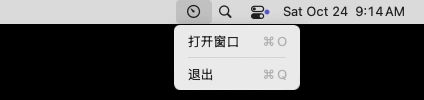
点击图标后出现的东西有两种。挂了 `menu`，点一下就弹出标准的下拉菜单：

<figure style="margin:1.5rem 0;text-align:center;">
<img src="/images/go-mac-native-gui/menu.webp" alt="菜单栏里高亮的仪表盘图标下面弹出下拉菜单：打开窗口 ⌘O、退出 ⌘Q" width="424" height="100" loading="lazy" style="max-width:100%;height:auto;border-radius:8px;" />
<figcaption style="font-size:0.9em;opacity:0.75;">挂了 NSMenu 的 NSStatusItem，点开就是系统标准的下拉菜单，快捷键也是菜单项自带的。</figcaption>
</figure>

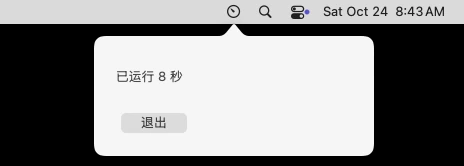
想要一块能放任意内容的面板，就不挂菜单，而是给按钮设一个点击动作，在动作里弹出 `NSPopover`[^nspopover]，并让它贴着图标的下边缘：

```go
bounds := objc.Send[NSRect](button, sel("bounds"))
pop.Send(sel("showRelativeToRect:ofView:preferredEdge:"), bounds, button, uint(1)) // 1：图标下方
```

点击动作要有一个 Objective-C 对象来接。purego 可以在运行时注册一个新的 Objective-C 类，方法体就是一个 Go 函数：

```go
handler, _ := objc.RegisterClass("GoStatusHandler", cls("NSObject"), nil, nil, []objc.MethodDef{
	{Cmd: sel("toggle:"), Fn: func(_ objc.ID, _ objc.SEL, _ objc.ID) { toggle() }},
})
button.Send(sel("setTarget:"), objc.ID(handler).Send(sel("new")))
button.Send(sel("setAction:"), sel("toggle:"))
```

<figure style="margin:1.5rem 0;text-align:center;">
<img src="/images/go-mac-native-gui/popover.webp" alt="菜单栏图标正下方弹出一个带箭头的面板，里面写着已运行 8 秒，下面一个退出按钮" width="464" height="166" loading="lazy" style="max-width:100%;height:auto;border-radius:8px;" />
<figcaption style="font-size:0.9em;opacity:0.75;">在 Linux 上交叉编译的 purego 程序，在 macOS 15 上点开菜单栏图标弹出的 NSPopover。</figcaption>
</figure>

### 不要 Dock 图标

菜单栏程序一般不希望在 Dock 里也占一个位置，也不希望自己被切到前台时把屏幕左上角的菜单换成自己的。AppKit 管这叫激活策略（activation policy）：`regular` 是普通 App，`accessory` 没有 Dock 图标也不接管菜单栏，但仍然可以有窗口[^activation-policy]。可以在代码里设：

```go
app.Send(sel("setActivationPolicy:"), 1) // NSApplicationActivationPolicyAccessory
```

也可以写在 `.app` 的 Info.plist 里，把 `LSUIElement` 设为 `true`[^lsuielement]，这样程序一启动就是 `accessory`，连 Dock 图标闪一下都不会有。实测里那些只有菜单栏图标的库，打包时加了这个键，`lsappinfo` 报告的类型都是 `UIElement`。

但 Info.plist 给的只是初始值，代码里再调一次 `setActivationPolicy:` 就会覆盖它。Gio 在启动时会主动设成 `regular`，我们给 Gio 的例子加上 `LSUIElement` 以后，`lsappinfo` 报告的类型仍然是 `Foreground`，Dock 里照样有图标。所以用某个库做菜单栏程序之前，要先看它会不会自己改激活策略。

**到这里，一个菜单栏小程序需要的东西都齐了。但每个控件都这样一条条发消息，写起来很累。现成的库能省多少事，代价又是什么？**

## 四、现成的库

### 窗口里的内容由谁来画

Go 生态里能在 Mac 上开窗口的库不少，第一眼很难分清。按“窗口里的内容由谁来画”来分就清楚了：窗口这个外壳，大家用的都是 AppKit 的 `NSWindow`；区别在里面那块内容。

<figure class="dd dd-figure">
<div class="dd-scroll">
<svg class="dd-svg" viewBox="0 0 800 376" xmlns="http://www.w3.org/2000/svg" role="img" aria-labelledby="gmf3-title gmf3-desc">
<title id="gmf3-title">窗口里的内容由谁来画</title>
<desc id="gmf3-desc">四栏。前三栏都是同一个 NSWindow 外壳，里面的内容来源不同：第一栏是 AppKit 自带的 NSTextField、NSButton，对应 cgo、purego、darwinkit；第二栏是一块 Metal 或 OpenGL 画布，由框架自己画控件，对应 Fyne、Gio、Cogent Core、Qt；第三栏是 WKWebView 里的网页，地址是 wails://localhost/，对应 Wails v3、webview_go，以及 Electron、CEF 一类。第四栏没有窗口，只有菜单栏里的 NSStatusItem 和下拉的 NSMenu，对应 fyne.io/systray、energye/systray、menuet。</desc>
<rect class="dd-frame" width="800" height="376" rx="10"/>
<rect class="dd-zone" x="16" y="16" width="180" height="344" rx="8"/>
<text class="t-zone" x="32" y="44">AppKit 控件</text>
<rect class="dd-card" x="32" y="60" width="148" height="124" rx="6"/>
<path class="dd-card-head" d="M38 60 H174 Q180 60 180 66 V84 H32 V66 Q32 60 38 60 Z"/>
<circle class="dd-dot" cx="44" cy="72" r="3.5"/>
<circle class="dd-dot" cx="55" cy="72" r="3.5"/>
<circle class="dd-dot" cx="66" cy="72" r="3.5"/>
<text class="t-mono" x="170" y="76" text-anchor="end"><tspan class="t-acc">NSWindow</tspan></text>
<text class="t-mono" x="48" y="126">NSTextField</text>
<text class="t-mono" x="48" y="150">NSButton</text>
<text class="t-name" x="32" y="216">cgo + Objective-C</text>
<text class="t-name" x="32" y="240">purego</text>
<text class="t-name" x="32" y="264">darwinkit</text>
<text class="t-say" x="32" y="324">和系统自带 App</text>
<text class="t-say" x="32" y="342">用同一套控件</text>
<rect class="dd-zone" x="212" y="16" width="180" height="344" rx="8"/>
<text class="t-zone" x="228" y="44">GPU 自己画</text>
<rect class="dd-card" x="228" y="60" width="148" height="124" rx="6"/>
<path class="dd-card-head" d="M234 60 H370 Q376 60 376 66 V84 H228 V66 Q228 60 234 60 Z"/>
<circle class="dd-dot" cx="240" cy="72" r="3.5"/>
<circle class="dd-dot" cx="251" cy="72" r="3.5"/>
<circle class="dd-dot" cx="262" cy="72" r="3.5"/>
<text class="t-mono" x="366" y="76" text-anchor="end"><tspan class="t-acc">NSWindow</tspan></text>
<rect class="dd-derived" x="238" y="94" width="128" height="80" rx="4"/>
<text class="t-mono" x="244" y="126">一张 Metal /</text>
<text class="t-mono" x="244" y="150">OpenGL 画布</text>
<text class="t-name" x="228" y="216">Fyne（OpenGL）</text>
<text class="t-name" x="228" y="240">Gio（Metal）</text>
<text class="t-name" x="228" y="264">Cogent Core</text>
<text class="t-name" x="228" y="288">Qt（miqt）</text>
<text class="t-say" x="228" y="324">虚线框里全是框架</text>
<text class="t-say" x="228" y="342">自己画的，含字体</text>
<rect class="dd-zone" x="408" y="16" width="180" height="344" rx="8"/>
<text class="t-zone" x="424" y="44">WKWebView 网页</text>
<rect class="dd-card" x="424" y="60" width="148" height="124" rx="6"/>
<path class="dd-card-head" d="M430 60 H566 Q572 60 572 66 V84 H424 V66 Q424 60 430 60 Z"/>
<circle class="dd-dot" cx="436" cy="72" r="3.5"/>
<circle class="dd-dot" cx="447" cy="72" r="3.5"/>
<circle class="dd-dot" cx="458" cy="72" r="3.5"/>
<text class="t-mono" x="562" y="76" text-anchor="end"><tspan class="t-acc">NSWindow</tspan></text>
<text class="t-mono" x="440" y="126">&lt;h3&gt;…&lt;/h3&gt;</text>
<text class="t-mono" x="440" y="150">wails://</text>
<text class="t-mono" x="440" y="170">localhost/</text>
<text class="t-name" x="424" y="216">Wails v3</text>
<text class="t-name" x="424" y="240">webview_go</text>
<text class="t-name" x="424" y="264">（Electron / CEF）</text>
<text class="t-say" x="424" y="324">HTML 由 WebKit</text>
<text class="t-say" x="424" y="342">在别的进程里渲染</text>
<rect class="dd-zone" x="604" y="16" width="180" height="344" rx="8"/>
<text class="t-zone" x="620" y="44">只有菜单栏图标</text>
<rect class="dd-card" x="620" y="60" width="148" height="24" rx="4"/>
<rect class="dd-bar" x="628" y="68" width="40" height="8" rx="2"/>
<rect class="dd-fill-acc" x="734" y="63" width="22" height="18" rx="4"/>
<rect class="dd-card" x="632" y="92" width="136" height="92" rx="6"/>
<text class="t-mono" x="644" y="114">NSMenu</text>
<line class="dd-hair" x1="632" y1="124" x2="768" y2="124"/>
<text class="t-name" x="644" y="146">打开窗口</text>
<text class="t-name" x="644" y="170">退出</text>
<text class="t-name" x="620" y="216">fyne.io/systray</text>
<text class="t-name" x="620" y="240">energye/systray</text>
<text class="t-name" x="620" y="264">menuet</text>
<text class="t-say" x="620" y="324">没有窗口，要窗口</text>
<text class="t-say" x="620" y="342">得再配一个库</text>
</svg>
</div>
<figcaption>图 3 · 窗口本身都是 AppKit 的 NSWindow，区别在里面那块内容是系统控件、框架自己画的画布，还是一个网页</figcaption>
</figure>

- **用 AppKit 自己的控件**：上面手写 cgo 和 purego 的做法，以及 darwinkit[^darwinkit]。它把 Apple SDK 里的 AppKit、Foundation、WebKit 等框架生成了 Go 绑定，写起来像 `appkit.NewWindowWithSize(360, 160)`，底层是 cgo 加 libffi。控件就是系统控件，长相、无障碍、输入法都和系统自带的 App 一致。
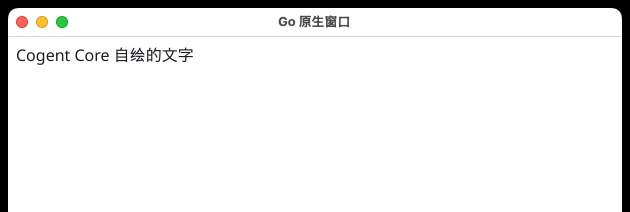
- **框架自己用 GPU 画**：Fyne[^fyne]、Gio[^gio]、Cogent Core[^cogent]，还有 Qt（Go 里用 miqt[^miqt] 绑定）。窗口里是一块 OpenGL 或 Metal 画布，按钮、文字、滚动条全是框架自己画的。好处是一套代码在 Windows、Linux 上长得一样，代价是长相不完全是 Mac 的，字体也要框架自己找。
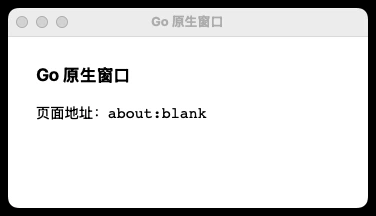
- **放一个 WKWebView**：Wails[^wails] 和 webview_go[^webview]。窗口里是系统自带的 WebKit 浏览器内核，界面用 HTML、CSS、JavaScript 写。更重的 Electron、CEF 一类（Go 里有 energy[^energy]、go-astilectron）是自己带一个 Chromium。
- **只有菜单栏图标**：fyne.io/systray[^systray]、energye/systray[^energye-systray] 和更早的 getlantern/systray[^getlantern]，以及只为 Mac 菜单栏设计的 menuet[^menuet]。它们只管 `NSStatusItem` 和下拉菜单，不管窗口。

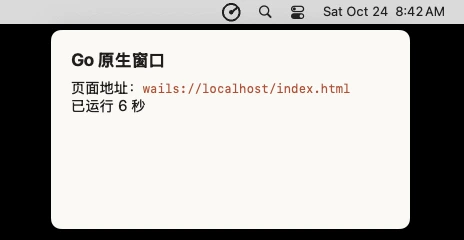
开头那个问题“是不是 http server 出的页面”，在第三类上最容易混淆。Wails 和 webview_go 的界面确实是网页，但页面不是从本机端口拿的。Wails 给 WKWebView 注册了一个自定义协议 `wails://`，WebView 请求 `wails://localhost/index.html` 时，请求直接在进程内交给 Go 代码处理，嵌在二进制里的文件被原样返回[^wails-scheme]。我们的实测里，所有跑起来的方案用 `lsof` 查，都没有监听任何 TCP 端口。

### 同一个需求，挨个实测

为了能放在一起比，我们给每个库写了同一个小程序：菜单栏一个图标，菜单里“打开窗口”和“退出”，窗口里一行每秒更新的文字（只有图标的库省掉窗口，没有托盘 API 的库省掉图标）。全部用 `go build -ldflags="-s -w"` 编译，按图 4 的结构打成 `.app`，启动 8 秒后记录主进程的常驻内存和线程数、查监听端口，再截一张屏。

<figure class="dd dd-figure dt-figure">
<div class="dt-panel">
<div class="dt-title" id="gmt1-title">同一个菜单栏程序，12 种做法（macOS 15.7，Apple M2 Pro 虚拟机，Go 1.26）</div>
<div class="dt-scroll">
<table class="dt dt-sticky" aria-labelledby="gmt1-title">
<colgroup><col style="width:20%"><col><col><col><col><col></colgroup>
<thead>
<tr><th scope="col">方案</th><th scope="col">窗口里是什么</th><th scope="col">菜单栏图标</th><th scope="col">二进制</th><th scope="col">主进程内存</th><th scope="col">监听端口</th></tr>
</thead>
<tbody>
<tr class="dt-group"><th colspan="6" scope="rowgroup">直接调 AppKit</th></tr>
<tr><th scope="row">cgo + Objective-C</th><td>AppKit 控件</td><td>自己写</td><td class="num mono">1.7 MB</td><td class="num mono">38 MB</td><td class="c">无</td></tr>
<tr><th scope="row" class="acc">purego</th><td>AppKit 控件</td><td>自己写</td><td class="num mono">2.3 MB</td><td class="num mono">41 MB</td><td class="c">无</td></tr>
<tr><th scope="row">darwinkit</th><td>AppKit 控件</td><td>有</td><td class="num mono">17.6 MB</td><td class="num mono"><span class="bad">启动即崩</span></td><td class="c">—</td></tr>
<tr class="dt-group"><th colspan="6" scope="rowgroup">框架自绘</th></tr>
<tr><th scope="row">Fyne</th><td>自绘（OpenGL）</td><td>有</td><td class="num mono">22.7 MB</td><td class="num mono"><span class="bad">建不了窗口</span></td><td class="c">—</td></tr>
<tr><th scope="row">Gio</th><td>自绘（Metal）</td><td>无</td><td class="num mono">6.2 MB</td><td class="num mono">140 MB</td><td class="c">无</td></tr>
<tr><th scope="row">Cogent Core</th><td>自绘</td><td>无</td><td class="num mono">26.5 MB</td><td class="num mono">166 MB</td><td class="c">无</td></tr>
<tr><th scope="row">Qt（miqt）</th><td>Qt 控件</td><td>有</td><td class="num mono">29.5 MB＋Qt 库</td><td class="num mono">95 MB</td><td class="c">无</td></tr>
<tr class="dt-group"><th colspan="6" scope="rowgroup">WebView</th></tr>
<tr><th scope="row">Wails v3</th><td>WKWebView</td><td>有，可贴图标弹窗</td><td class="num mono">10.3 MB</td><td class="num mono">83 MB＊</td><td class="c">无</td></tr>
<tr><th scope="row">webview_go</th><td>WKWebView</td><td>无</td><td class="num mono">2.0 MB</td><td class="num mono">69 MB＊</td><td class="c">无</td></tr>
<tr class="dt-group"><th colspan="6" scope="rowgroup">只有菜单栏图标</th></tr>
<tr><th scope="row">fyne.io/systray</th><td>无窗口</td><td>有</td><td class="num mono">2.5 MB</td><td class="num mono">28 MB</td><td class="c">无</td></tr>
<tr><th scope="row">energye/systray</th><td>无窗口</td><td>有，分左右键</td><td class="num mono">1.7 MB</td><td class="num mono">30 MB</td><td class="c">无</td></tr>
<tr><th scope="row">menuet</th><td>无窗口（只有 Alert）</td><td>有</td><td class="num mono">7.4 MB</td><td class="num mono">29 MB</td><td class="c">无</td></tr>
</tbody>
</table>
</div>
<p class="dt-note">二进制用 -ldflags="-s -w" 编译。内存是启动 8 秒后主进程的 RSS；＊WebView 的页面在 WebKit 的独立进程里渲染，那部分没有算进来。purego 那一行是在 Linux 上交叉编译、拷到 Mac 上跑的。</p>
</div>
<figcaption>表 1 · 只要菜单栏图标的库最轻；自绘框架内存最高；所有方案都不开端口</figcaption>
</figure>

<figure style="margin:1.5rem 0;display:grid;grid-template-columns:repeat(auto-fit,minmax(240px,1fr));gap:14px;align-items:start;">
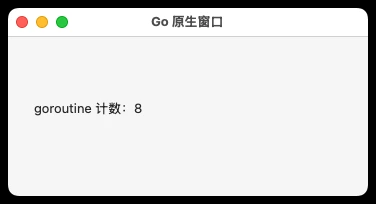
<div><img src="/images/go-mac-native-gui/win-cgo.webp" alt="cgo 手写 Objective-C 的窗口：系统标准标题栏，文字是 goroutine 计数 8" width="376" height="204" loading="lazy" style="width:100%;height:auto;border-radius:6px;" /><div style="font-size:0.85em;opacity:0.75;text-align:center;">cgo + Objective-C：系统控件</div></div>
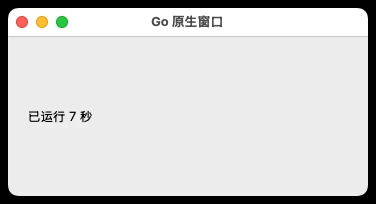
<div><img src="/images/go-mac-native-gui/win-miqt.webp" alt="Qt 的窗口：标题栏和系统一样，文字已运行 7 秒" width="376" height="204" loading="lazy" style="width:100%;height:auto;border-radius:6px;" /><div style="font-size:0.85em;opacity:0.75;text-align:center;">Qt（miqt）：Qt 按 Mac 风格自己画</div></div>
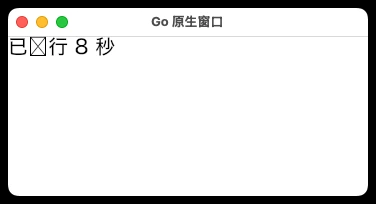
<div><img src="/images/go-mac-native-gui/win-gio.webp" alt="Gio 的窗口：文字已运行 8 秒中的运字显示成一个方框" width="376" height="204" loading="lazy" style="width:100%;height:auto;border-radius:6px;" /><div style="font-size:0.85em;opacity:0.75;text-align:center;">Gio：“运”字成了方框</div></div>
<div><img src="/images/go-mac-native-gui/win-cogent.webp" alt="Cogent Core 的窗口：Cogent Core 自绘的文字" width="630" height="212" loading="lazy" style="width:100%;height:auto;border-radius:6px;" /><div style="font-size:0.85em;opacity:0.75;text-align:center;">Cogent Core：自绘</div></div>
<div><img src="/images/go-mac-native-gui/win-wails.webp" alt="Wails 的无边框窗口贴着菜单栏图标弹出，页面地址显示 wails://localhost/index.html" width="464" height="240" loading="lazy" style="width:100%;height:auto;border-radius:6px;" /><div style="font-size:0.85em;opacity:0.75;text-align:center;">Wails v3：贴着图标弹出的网页</div></div>
<div><img src="/images/go-mac-native-gui/win-webview.webp" alt="webview_go 的窗口：页面地址 about:blank" width="376" height="216" loading="lazy" style="width:100%;height:auto;border-radius:6px;" /><div style="font-size:0.85em;opacity:0.75;text-align:center;">webview_go：about:blank 上的网页</div></div>
<figcaption style="grid-column:1/-1;font-size:0.9em;opacity:0.75;text-align:center;">同一个需求在 macOS 15 上的样子。Fyne 和 darwinkit 没有截到，原因见下文。</figcaption>
</figure>

几处值得单独说：

- **自绘框架要自己找字体。** Gio 窗口里“已运行 8 秒”的“运”字显示成了一个方框，按钮、文字都是 Gio 自己排版、自己画的，字体回退没找到这个字形。同一台机器上用 AppKit 控件的方案，中文全部正常。
- **Fyne 在这台虚拟机上没能开出窗口。** 程序一启动就退出，日志是 `NSGL: Failed to find a suitable pixel format`。Fyne 在 macOS 上仍然通过 GLFW 用 OpenGL 画界面，而 GitHub 的 macOS 虚拟机给不出可用的 OpenGL 像素格式；同样是 GPU 自绘、走 Metal 的 Gio 和 Cogent Core 都正常。我们手上没有 Mac 真机，Fyne 在真机上通常能正常开窗口，这一点是推断；这次能确定的只是，它比走 Metal 的框架多依赖了一样已经被 Apple 标为废弃的东西。
- **darwinkit 的例子启动就 `SIGABRT`。** 我们的例子和 darwinkit 仓库自带的 menu 示例都一样，崩在 `app.Run()` 里，没有打印 Objective-C 异常。我们没有继续追，只记下它最后一次发版是 2024 年 6 月，在 macOS 15.7 上用要先自己验证。
- **Qt 最重。** 要先 `brew install qt`，miqt 第一次编译花了 155 秒；二进制 29.5 MB 还只是 Go 这部分，Qt 的几个框架是动态链接的，发给别人时要一起打进 `.app`。
- **WebView 方案的内存要分开看。** Wails 和 webview_go 主进程只有七八十 MB，但页面是 WebKit 在独立的 WebContent 进程里渲染的，表里没有算上。

**Gio 和 webview_go 都只管窗口，不管菜单栏图标。那再配一个 systray 库，不就两样都有了吗？**

## 五、窗口和图标来自两个库

### 现象

最直接的写法，是把 `systray.Run` 放进 goroutine，主线程留给 webview：

```go
go systray.Run(onReady, nil) // 主线程要留给 webview，只好把 systray 放进 goroutine
w := webview.New(false)
w.Run()
```

在 Mac 上跑起来，菜单栏图标出来了，日志里也打印了 `systray onReady`；可是 `webview.New` 之后的那行日志始终没有出现，窗口一直没有弹出来，程序就卡在那里。

### 原因：事件循环只能有一个

回到第二节：主线程上只能跑一个事件循环。`systray.Run` 和 `webview.Run` 各自都想在主线程上调用 `[NSApp run]` 并一直占着它。把其中一个挪进 goroutine，它就跑在了别的线程上，违反了 AppKit 的主线程规定。

### 解决：让一个库挂到另一个库的循环上

fyne.io/systray 为这种情况留了一个口子：`RunWithExternalLoop` 不自己跑循环，只返回一个 `start` 函数，等别人的事件循环转起来以后，在主线程上调用它就行。webview_go 的 `Dispatch` 正好能把函数排到主线程上：

```go
start, _ := systray.RunWithExternalLoop(onReady, nil)
w.Dispatch(start) // 事件循环转起来以后，在主线程上执行
w.Run()
```

这样改完，窗口和菜单栏图标都出来了，点图标也能正常弹出菜单。

更省心的办法，是直接选窗口和图标都管的框架：Fyne 的 `desktop.App` 有 `SetSystemTrayMenu`[^fyne-systray]，Wails v3 有 `SystemTray`，还能用 `AttachWindow` 让一个无边框窗口贴着图标弹出，效果和 `NSPopover` 差不多；Qt 有 `QSystemTrayIcon`。

**程序能跑了。可现在它还只是一个命令行可执行文件，怎么变成能放进“应用程序”文件夹的 `.app`？**

## 六、打包成 .app

### .app 只是一个目录

`go build` 产出的是一个裸的可执行文件。直接在终端里运行它，窗口和图标都会出来，但 Dock 里显示的名字是可执行文件名，没有自己的图标，Info.plist 里的设置（比如 `LSUIElement`）也无处可写。

`.app` 其实只是一个按约定组织的目录，Finder 把它显示成一个图标[^bundle]。最小的结构只要两样东西：`Contents/MacOS/` 下放可执行文件，`Contents/Info.plist` 里用 `CFBundleExecutable` 指向它。

<figure class="dd dd-figure">
<div class="dd-scroll">
<svg class="dd-svg" viewBox="0 0 800 336" xmlns="http://www.w3.org/2000/svg" role="img" aria-labelledby="gmf4-title gmf4-desc">
<title id="gmf4-title">.app 包的结构和 Info.plist</title>
<desc id="gmf4-desc">左边是 Demo.app 的目录：Contents 下有 Info.plist、MacOS/demo（go build 的产物）、Resources/AppIcon.icns，以及签名后才出现的 _CodeSignature/CodeResources。右边是 Info.plist 的关键字段：CFBundleExecutable 等于 demo，指向 MacOS 目录里的可执行文件；CFBundleIdentifier 是 net.twwy.demo；CFBundleIconFile 是 AppIcon；LSUIElement 为 true，不在 Dock 里出现；LSMinimumSystemVersion 是 12.0。</desc>
<defs>
<marker id="gmf4-arrow-acc" markerWidth="8" markerHeight="8" refX="7" refY="4" orient="auto"><path class="dd-head-acc" d="M1 1 L7 4 L1 7"/></marker>
</defs>
<rect class="dd-frame" width="800" height="336" rx="10"/>
<rect class="dd-zone" x="16" y="16" width="344" height="304" rx="8"/>
<rect class="dd-zone" x="376" y="16" width="408" height="304" rx="8"/>
<text class="t-zone" x="32" y="44">目录（Finder 里显示成一个图标）</text>
<text class="t-zone" x="392" y="44">Contents/Info.plist</text>
<path class="dd-edge-acc" d="M392 125 H372 Q364 125 364 133 V156 Q364 164 356 164 H348" marker-end="url(#gmf4-arrow-acc)"/>
<rect class="dd-card" x="32" y="64" width="312" height="176" rx="6"/>
<text class="t-mono" x="48" y="90">Demo.app/</text>
<text class="t-mono" x="64" y="116">Contents/</text>
<text class="t-mono" x="80" y="142">Info.plist</text>
<text class="t-mono" x="80" y="168">MacOS/<tspan class="t-acc">demo</tspan></text>
<text class="t-note" x="300" y="168" text-anchor="end">go build 的产物</text>
<text class="t-mono" x="80" y="194">Resources/AppIcon.icns</text>
<text class="t-mono" x="80" y="220">PkgInfo</text>
<rect class="dd-derived" x="32" y="252" width="312" height="44" rx="6"/>
<text class="t-mono" x="48" y="279">Contents/_CodeSignature/CodeResources</text>
<text class="t-say" x="48" y="312">虚线：codesign 签名时才生成</text>
<rect class="dd-card" x="392" y="64" width="376" height="240" rx="6"/>
<path class="dd-card-head" d="M398 64 H762 Q768 64 768 70 V96 H392 V70 Q392 64 398 64 Z"/>
<text class="t-name" x="408" y="85">键</text>
<text class="t-name" x="608" y="85">值</text>
<text class="t-mono" x="408" y="121">CFBundleExecutable</text>
<text class="t-val" x="608" y="121"><tspan class="t-acc">demo</tspan></text>
<line class="dd-hair" x1="392" y1="130" x2="768" y2="130"/>
<text class="t-mono" x="408" y="147">CFBundleIdentifier</text>
<text class="t-val" x="608" y="147">net.twwy.demo</text>
<line class="dd-hair" x1="392" y1="156" x2="768" y2="156"/>
<text class="t-mono" x="408" y="173">CFBundleIconFile</text>
<text class="t-val" x="608" y="173">AppIcon</text>
<line class="dd-hair" x1="392" y1="182" x2="768" y2="182"/>
<text class="t-mono" x="408" y="199">LSUIElement</text>
<text class="t-val" x="608" y="199">true</text>
<text class="t-note" x="752" y="199" text-anchor="end">不进 Dock</text>
<line class="dd-hair" x1="392" y1="208" x2="768" y2="208"/>
<text class="t-mono" x="408" y="225">LSMinimumSystemVersion</text>
<text class="t-val" x="608" y="225">12.0</text>
<line class="dd-hair" x1="392" y1="234" x2="768" y2="234"/>
<text class="t-mono" x="408" y="251">CFBundlePackageType</text>
<text class="t-val" x="608" y="251">APPL</text>
<line class="dd-hair" x1="392" y1="260" x2="768" y2="260"/>
<text class="t-mono" x="408" y="277">NSHighResolutionCapable</text>
<text class="t-val" x="608" y="277">true</text>
</svg>
</div>
<figcaption>图 4 · .app 只是一个约定好结构的目录：Info.plist 里的 CFBundleExecutable 指向 go build 出来的那个文件</figcaption>
</figure>

不想手写的话，Fyne 有 `fyne package`，Wails 有 `wails3 package`，都会生成这个目录、把 PNG 转成 `.icns` 图标；自己写一个 shell 脚本也就十几行。要同时支持 Apple 芯片和 Intel，分别用 `GOARCH=arm64` 和 `GOARCH=amd64` 编译，再用 `lipo -create` 合成一个通用二进制放进去。

## 七、签名和公证

### 在自己的机器上：已经签好了

Apple 芯片的 Mac 不运行没有签名的代码。好在 Go 的链接器在生成 darwin/arm64 二进制时会自动做一次 ad-hoc 签名，哪怕是在 Linux 上交叉编译的。拿第一节在 Linux 上编出来的文件到 Mac 上看：

```text
$ codesign -dv menubar
Format=Mach-O thin (arm64)
CodeDirectory v=20400 size=17694 flags=0x20002(adhoc,linker-signed) hashes=550+0 location=embedded
Signature=adhoc
TeamIdentifier=not set
```

打成 `.app` 以后，Info.plist 也要纳入签名，再执行一次 `codesign --force --deep -s - Demo.app` 就行。这种签名只证明“文件没被改过”，不证明“是谁做的”。

### 发给别人：Gatekeeper 拦下来

从浏览器、聊天工具下载的文件会被打上 `com.apple.quarantine` 扩展属性，第一次打开时 Gatekeeper 会检查它是否经过 Apple 公证。只有 ad-hoc 签名的 App 过不了这一关：

```text
$ spctl -a -vv -t exec Demo.app
Demo.app: rejected
```

<figure style="margin:1.5rem 0;text-align:center;">
<img src="/images/go-mac-native-gui/gatekeeper.webp" alt="对话框：“Downloaded” Not Opened。Apple could not verify “Downloaded” is free of malware that may harm your Mac or compromise your privacy. 两个按钮：Done 和 Move to Trash" width="276" height="248" loading="lazy" style="max-width:100%;height:auto;border-radius:8px;" />
<figcaption style="font-size:0.9em;opacity:0.75;">给 ad-hoc 签名的 App 加上隔离属性，模拟从网上下载，再双击打开。</figcaption>
</figure>

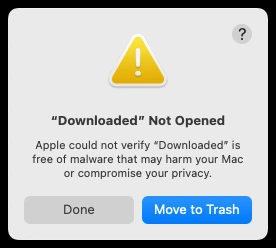
对话框里只有“完成”和“移到废纸篓”两个按钮，没有“打开”。

macOS 15 以前，用户还可以按住 Control 点“打开”绕过去；从 macOS 15 起这条路取消了，只能到“系统设置 → 隐私与安全性”里找到被拦的 App，点“仍要打开”再输密码[^sequoia-gatekeeper]。自己用无所谓，发给别人就很劝退。

### 正路：Developer ID 签名加公证

要让别人双击就能打开，需要加入 Apple Developer Program（每年 99 美元）拿到 Developer ID 证书，然后三步[^notarize]：

```bash
codesign --force --options runtime --timestamp \
  -s "Developer ID Application: 你的名字 (TEAMID)" Demo.app   # 开启 hardened runtime 签名
ditto -c -k --keepParent Demo.app Demo.zip
xcrun notarytool submit Demo.zip --keychain-profile notary --wait  # 提交公证，等结果
xcrun stapler staple Demo.app                                   # 把公证票据钉到 App 上
```

公证是 Apple 的服务器扫描一遍二进制，通过后发一张票据；`staple` 把票据存进 App 里，用户离线打开时也能校验[^notarytool]。这几步本身不挑语言，Go 程序和 Swift 程序走的流程一样。

如果连签名也不想在 Mac 上做，rcodesign 是一个独立实现，能在 Linux 上完成签名、提交公证和 staple[^rcodesign]。配合 purego，一个 Mac 菜单栏程序从编译到公证可以全部在 Linux 的 CI 里完成。

## 八、怎么选

回到开头的需求：一个 Go 写的工具，要有原生窗口，右上角菜单栏能点开。按要做的事情从轻到重：

1. **只要一个菜单栏图标和下拉菜单**，用 fyne.io/systray 或 energye/systray。两三十行代码，二进制 2 MB 左右，常驻内存不到 30 MB。
2. **菜单栏图标加一个小面板或简单窗口，只在 Mac 上用**，直接调 AppKit。想在 Linux CI 里交叉编译就用 purego；喜欢有类型检查、照抄 Apple 文档就用 cgo 加一个 `.m` 文件。
3. **界面复杂一些，还要跑在 Windows 和 Linux 上**，用 Fyne：窗口和托盘都有，`fyne package` 一条命令打包。Gio 更轻、更快，但没有托盘，要按第五节的办法自己接 systray。
4. **团队里有前端，界面想用 HTML 写**，用 Wails v3：窗口、托盘、贴着图标弹出的面板都有，页面走 `wails://` 协议，不开端口。代价是每个窗口背后有 WebKit 的渲染进程。
5. **想要 Qt 那一整套控件**，用 miqt，要先装 Qt，首次编译很慢。

## 小结

1. Go 标准库没有窗口，Mac 上的窗口归 AppKit 管 → AppKit 的调用最终都是 `objc_msgSend`，Go 能调 C 函数就能用它。
2. 从 Go 到 `objc_msgSend` 有两座桥 → cgo 在编译期要 clang 和 SDK，只能在 Mac 上编；purego 在运行时调用，Linux 上也能交叉编译。
3. 为什么要在 `init` 里 `LockOSThread` → AppKit 只认主线程，goroutine 却会在线程间迁移；锁住以后 `main` 一直在主线程上跑事件循环，其他 goroutine 改界面要投递回主线程。
4. 右上角的图标是什么 → `NSStatusItem`，挂菜单或弹 `NSPopover`；用模板图适配深浅色；`accessory` 激活策略或 `LSUIElement` 去掉 Dock 图标。
5. 现成的库差在哪 → 窗口都是 `NSWindow`，里面的内容分别是系统控件、框架自绘的画布、WKWebView 网页；Wails 和 webview 是网页但不开端口。
6. 两个库各管窗口和图标为什么不行 → 主线程上只能有一个事件循环，要用 `RunWithExternalLoop` 一类的接口挂到同一个循环上。
7. 怎么交给别人用 → 打成 `.app`，用 Developer ID 签名并公证；只有 ad-hoc 签名的 App 会被 Gatekeeper 拦下。

## 附录：一个完整的菜单栏程序

下面就是第三节截图里的程序，不用 cgo，在任何系统上 `CGO_ENABLED=0 GOOS=darwin GOARCH=arm64 go build` 都能编译。点菜单栏图标弹出面板，面板里的计时由 goroutine 每秒更新。

```go
//go:build darwin

// 点一下右上角的图标，在图标正下方弹出一个面板（NSPopover），再点一下收起。
// 不用 cgo：GOOS=darwin CGO_ENABLED=0 go build 在 Linux 上也能编。
package main

import (
	"fmt"
	"runtime"
	"time"

	"github.com/ebitengine/purego"
	"github.com/ebitengine/purego/objc"
)

func init() { runtime.LockOSThread() }

type NSRect struct{ X, Y, W, H float64 }
type NSSize struct{ W, H float64 }

var (
	sel = objc.RegisterName
	cls = objc.GetClass
)

func nsstr(s string) objc.ID {
	return objc.ID(cls("NSString")).Send(sel("stringWithUTF8String:"), s)
}

func main() {
	purego.Dlopen("/System/Library/Frameworks/AppKit.framework/AppKit", purego.RTLD_GLOBAL|purego.RTLD_NOW)
	app := objc.ID(cls("NSApplication")).Send(sel("sharedApplication"))
	app.Send(sel("setActivationPolicy:"), 1) // Accessory：没有 Dock 图标

	// 面板里的内容：一个标签 + 一个退出按钮
	view := objc.ID(cls("NSView")).Send(sel("alloc")).Send(sel("initWithFrame:"), NSRect{0, 0, 280, 120})
	label := objc.ID(cls("NSTextField")).Send(sel("labelWithString:"), nsstr("已运行 0 秒"))
	label.Send(sel("setFrame:"), NSRect{20, 64, 240, 24})
	view.Send(sel("addSubview:"), label)
	quit := objc.ID(cls("NSButton")).Send(sel("buttonWithTitle:target:action:"), nsstr("退出"), app, sel("terminate:"))
	quit.Send(sel("setFrame:"), NSRect{20, 16, 80, 32})
	view.Send(sel("addSubview:"), quit)

	vc := objc.ID(cls("NSViewController")).Send(sel("new"))
	vc.Send(sel("setView:"), view)
	pop := objc.ID(cls("NSPopover")).Send(sel("new"))
	pop.Send(sel("setContentViewController:"), vc)
	pop.Send(sel("setContentSize:"), NSSize{280, 120})
	pop.Send(sel("setBehavior:"), 1) // Transient：点别处自动收起

	item := objc.ID(cls("NSStatusBar")).Send(sel("systemStatusBar")).Send(sel("statusItemWithLength:"), -1.0)
	button := item.Send(sel("button"))
	button.Send(sel("setImage:"), objc.ID(cls("NSImage")).Send(
		sel("imageWithSystemSymbolName:accessibilityDescription:"), nsstr("gauge.with.needle"), nsstr("Go")))

	toggle := func() {
		if objc.Send[bool](pop, sel("isShown")) {
			pop.Send(sel("performClose:"), objc.ID(0))
			return
		}
		bounds := objc.Send[NSRect](button, sel("bounds"))
		pop.Send(sel("showRelativeToRect:ofView:preferredEdge:"), bounds, button, uint(1)) // 1 = NSRectEdgeMinY，图标下方
		app.Send(sel("activateIgnoringOtherApps:"), true)
	}
	handler, err := objc.RegisterClass("GoStatusHandler", cls("NSObject"), nil, nil, []objc.MethodDef{
		{Cmd: sel("toggle:"), Fn: func(_ objc.ID, _ objc.SEL, _ objc.ID) { toggle() }},
	})
	if err != nil {
		panic(err)
	}
	target := objc.ID(handler).Send(sel("new"))
	button.Send(sel("setTarget:"), target)
	button.Send(sel("setAction:"), sel("toggle:"))

	start := time.Now()
	go func() {
		for range time.Tick(time.Second) {
			s := nsstr(fmt.Sprintf("已运行 %d 秒", int(time.Since(start).Seconds())))
			label.Send(sel("performSelectorOnMainThread:withObject:waitUntilDone:"), sel("setStringValue:"), s, false)
		}
	}()
	app.Send(sel("run"))
}
```

编译、打包、签名：

```bash
CGO_ENABLED=0 GOOS=darwin GOARCH=arm64 go build -ldflags="-s -w" -o menubar .
mkdir -p Menubar.app/Contents/MacOS && cp menubar Menubar.app/Contents/MacOS/
# 再按图 4 写好 Contents/Info.plist（CFBundleExecutable 填 menubar，LSUIElement 填 true）
codesign --force --deep -s - Menubar.app   # 在 Mac 上 ad-hoc 签名；在 Linux 上可以用 rcodesign
```

## 参考资料